
How to use Whisper+Me
Everything on the site, step by step, with pictures. Talk in live voice rooms, call people 1-on-1, earn from your calls, and meet up in real life with M&G, Connect Me and Plan a Date.
The pictures use example people and places.
👋 Getting started
Go to whisperplusme.com on your phone or computer. There's nothing to download.
- Sign up freeUse your email and a password, or tap Continue with Google. You can also look around as a guest first.
- Pick a display name and photoAny name works. Add a profile photo in 👤 Profile: it's needed to post or ask for a Plan a Date, and people are more likely to call you.
- Add it to your home screenOn Android or a computer, tap Install when it's offered. On iPhone, tap the Share button in Safari, then Add to Home Screen.
- Turn on notificationsAllow notifications so you hear when someone calls you, picks you for a date, or a meet-up is tomorrow.
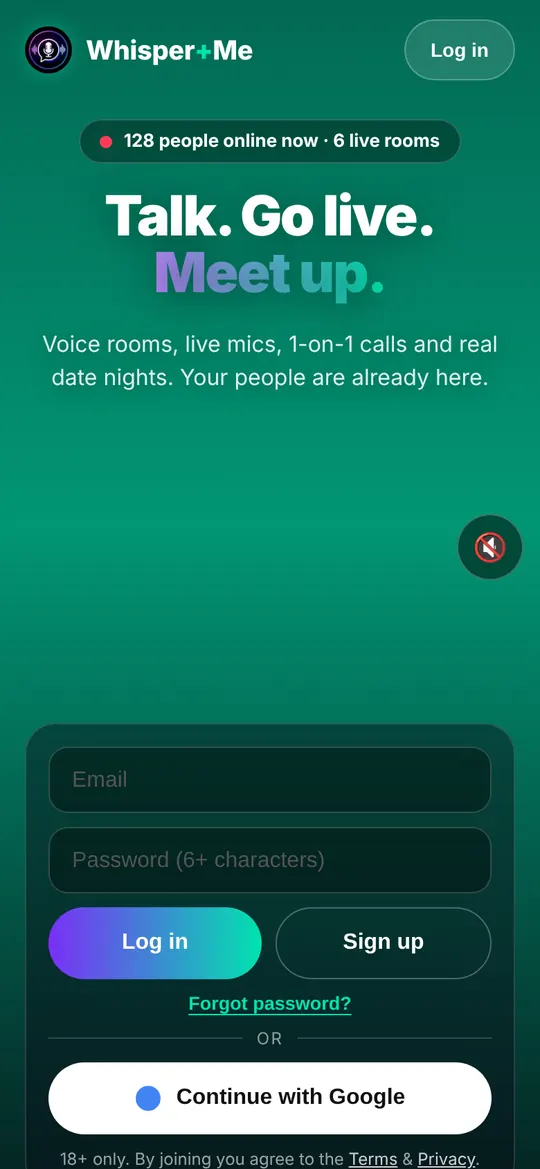
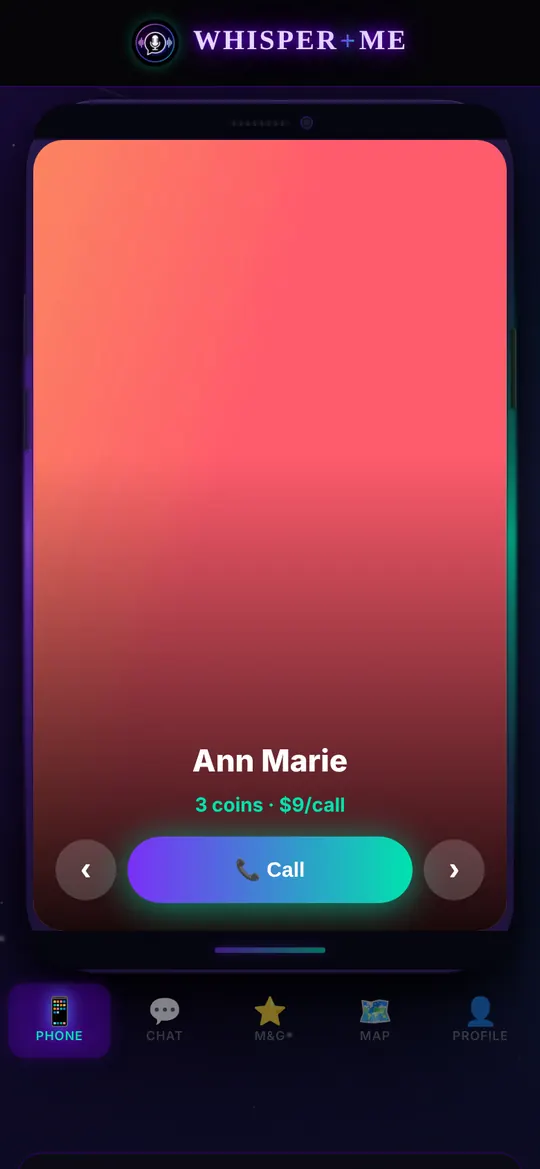
Getting around: the bar at the bottom has five screens: 📱 Phone (people you can call), 💬 Chat (voice rooms), ⭐ M&G (meet-ups, Connect Me and Plan a Date), 🗺️ Map (what's on near you) and 👤 Profile. On a phone you can also swipe left and right between them.
🎙️ Voice chat rooms
Rooms are open 24/7 and free. Each has live text chat and voice. You can talk or just listen.
- Open 💬 ChatScroll the room cards and tap one, like General, Night Owls or Vent & Release.
- Say hiType in the message bar at the bottom, or add a picture with 📷.
- Go live on the micTap 📢 (or Live at the top of the room) to speak to everyone for up to 3 minutes. A timer shows how long you have left.
- Share a roomEvery room card has a 🔗 Share button that sends a link straight into that room.
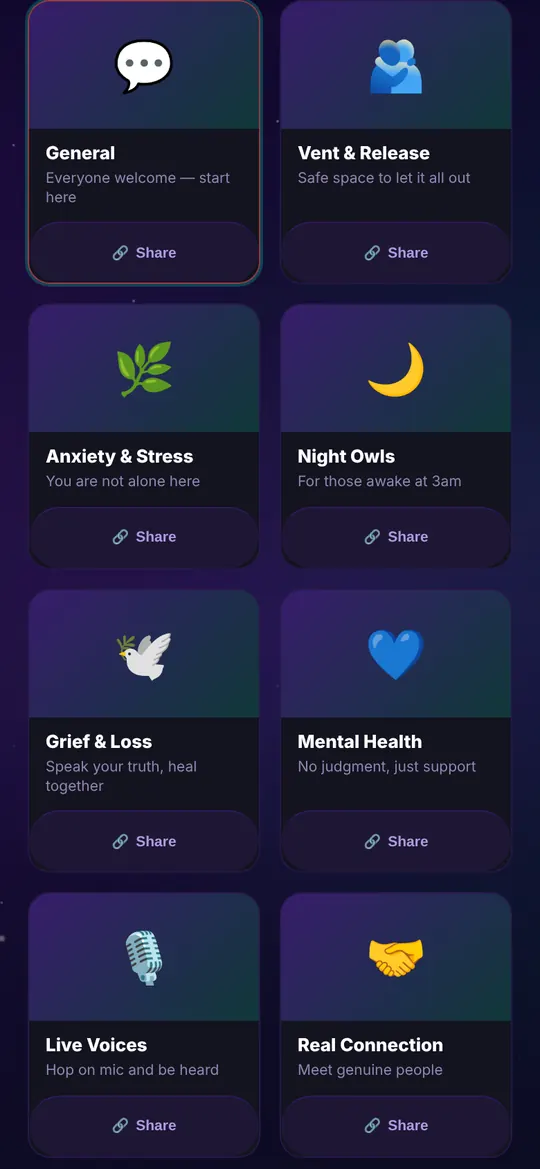
Member rooms: under the main rooms, members can open their own room for up to 10 people. The owner sets an entry price of 1 to 10 coins and earns those coins. Sessions last 3 minutes. You can have one room open at a time.
The map (🗺️): shows what's happening around you. ⭐ gold pins are M&Gs, 💞 pink pins are Connect Me nights, 📍 green pins are open Plan a Dates, and photos are members who turned their location on. Tap a pin to see it, then tap the button to get a spot or say you're interested. The buttons under the map turn each kind on or off, and Coming up lists the next few things on the map. Tap Location ON to show your own pin to members nearby. It turns itself off after 25 minutes.
See every room and what it's for on the voice chat rooms page.
📞 1-on-1 calls
Call any member who has calls turned on. Each person sets their own price in coins, shown on their card.
- Open 📱 PhoneSwipe through the people cards. A green dot means they're online now.
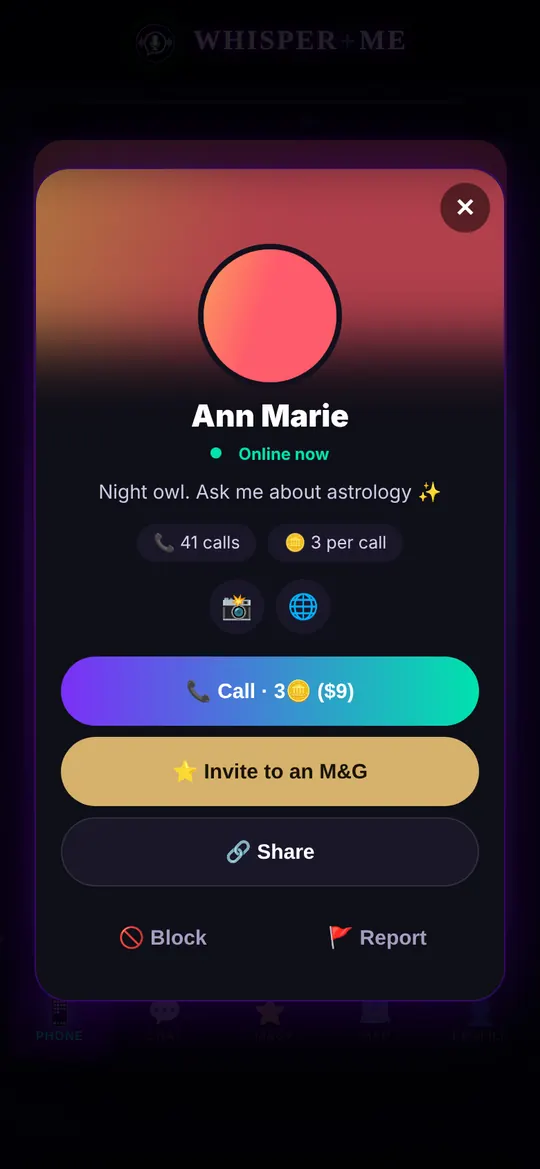
- Tap a card to see their profileYou'll see their bio, how many calls they've had, their price and links.
- Tap 📞 CallYou need enough coins for their price (buy them in 👤 Profile → Wallet). Calls last up to 3 minutes and end on their own.
- Block or reportEvery profile has 🚫 Block and 🚩 Report at the bottom. Blocked people can't call you or ask to go on your dates.
👤 Your profile, coins & earnings
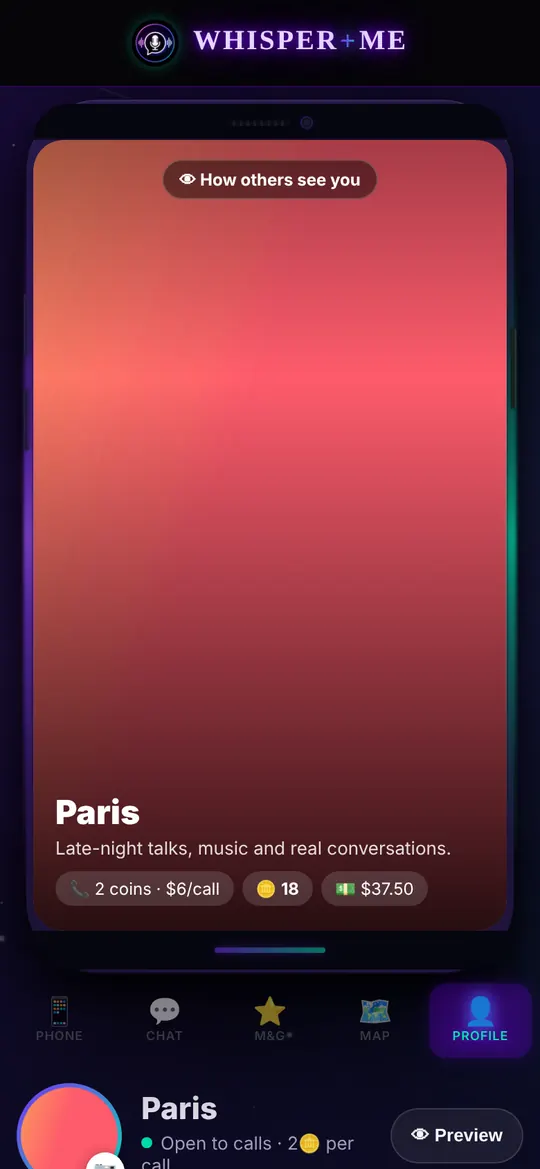
The 👤 Profile screen has four tabs: Profile, Wallet, Calls and More. Tap Preview to see your card the way others see it.
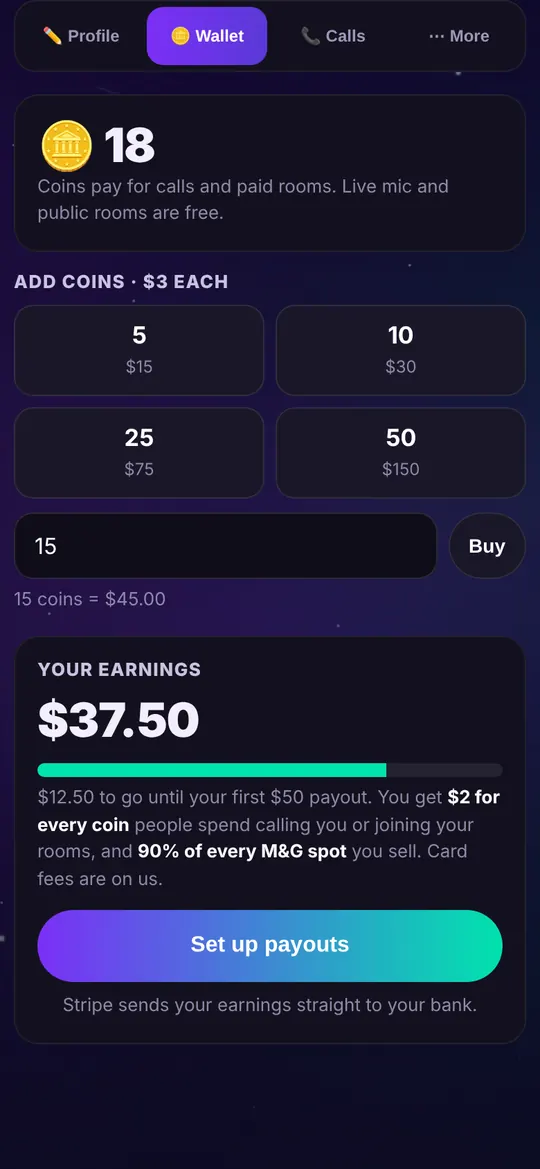
- Buy coins: in Wallet, pick 5, 10, 25 or 50 coins, or type an amount, and tap Buy. Coins cost $3 each.
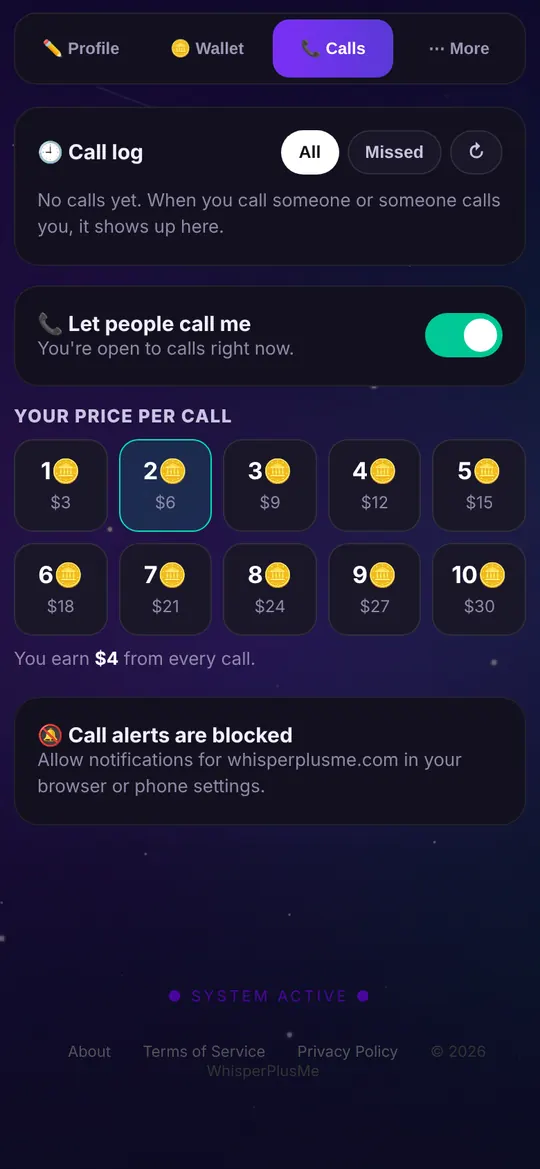
- Set your price: in Calls, pick 1 to 10 coins per call. You earn $2 for every coin.
- Take calls: turn on Let people call me. Allow notifications so your phone rings even when the site is closed.
- Get paid: in Wallet, tap Set up payouts. Stripe sends your earnings to your bank once you reach $50. Card fees are paid by Whisper+Me.
- Share your profile: your profile has a link (whisperplusme.com/u/…) and a picture for Stories, so people can find and call you.
⭐ M&G (meet & greet)
Want the short version to share? whisperplusme.com/meet explains M&G, Connect Me and Plan a Date in one page.
M&Gs are meet-ups at real public places: dinner, bowling, brunch and more. Each one is hosted by a member or by Whisper+Me, and you buy one spot per person. You must be 21+.
Going to an M&G
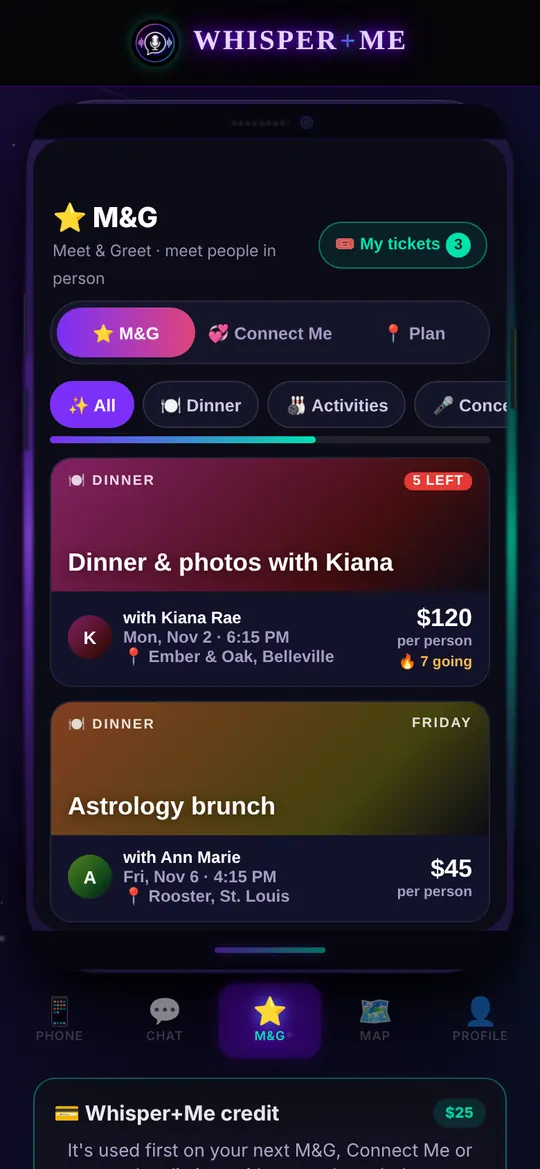
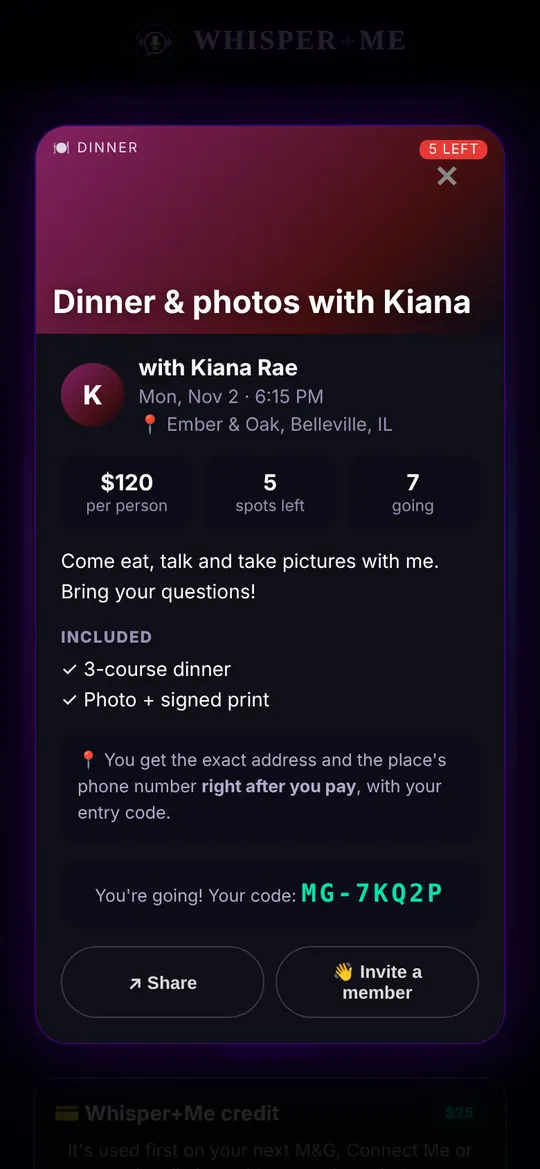
- Open ⭐ M&GBrowse by category (Dinner, Activities, Concerts…). Each card shows the host, the day, the place and the price.
- Tap a card, then Get my spotYou can buy for yourself and up to 5 friends in one order. You pay with a card through Stripe (or your credit).
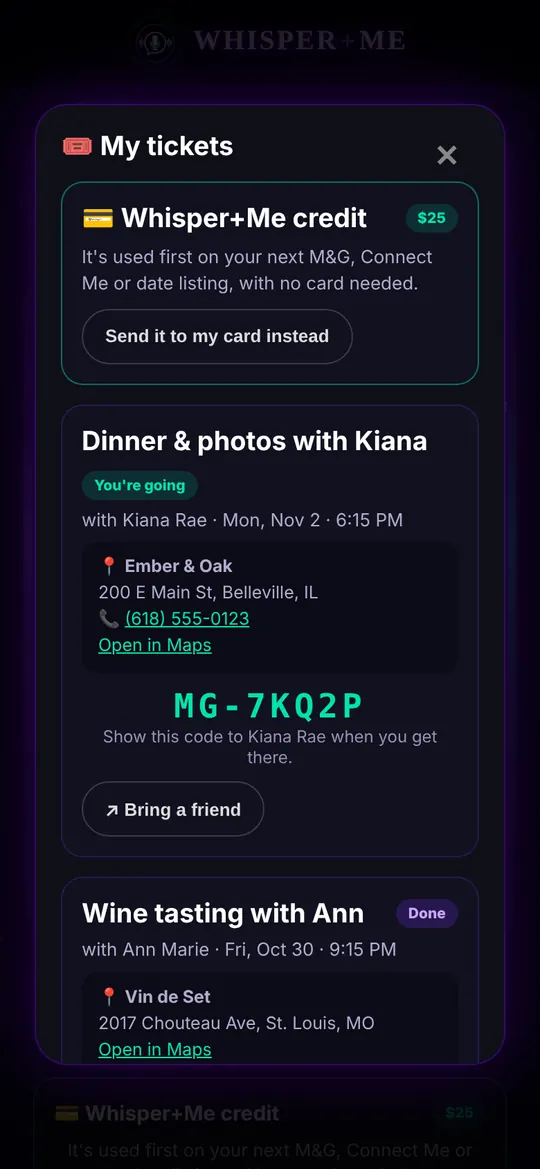
- Find your codeTap 🎟️ My tickets. After you pay you'll see the exact address, the place's phone number and your entry code.
- Check inAt the place, tap I'm here or show your code to the host.
- Rate itAfterwards you can rate the host from 1 to 5 stars. Only Whisper+Me sees written comments.
Hosting an M&G
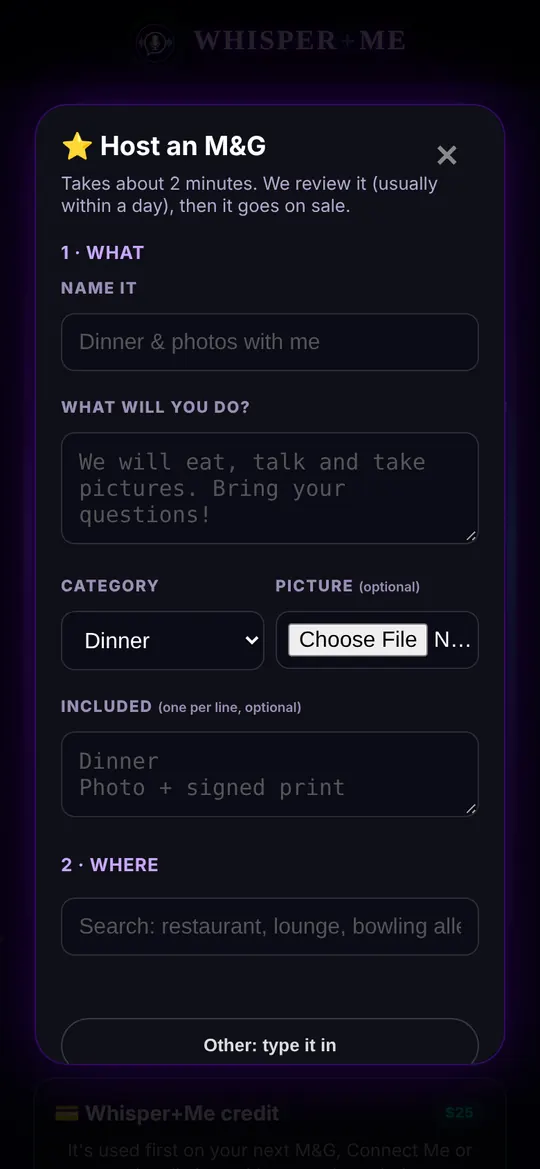
- Tap ⭐ Host oneName it, say what you'll do, pick a category and add a picture.
- Pick the placeSearch for the restaurant, lounge or venue. It must be a real public business with an address and phone number.
- Set the day, price and spotsWhisper+Me reviews every M&G, usually within a day, before it goes on sale.
- Keep a host depositYou pay it once (the price of one spot, or $5). It stays on your account for future M&Gs and is only kept if you cancel late or don't show up.
- Get paidWhisper+Me keeps 10%. The rest goes to your earnings about 3 days after the M&G, once you've checked in your guests.
💞 Connect Me nights out
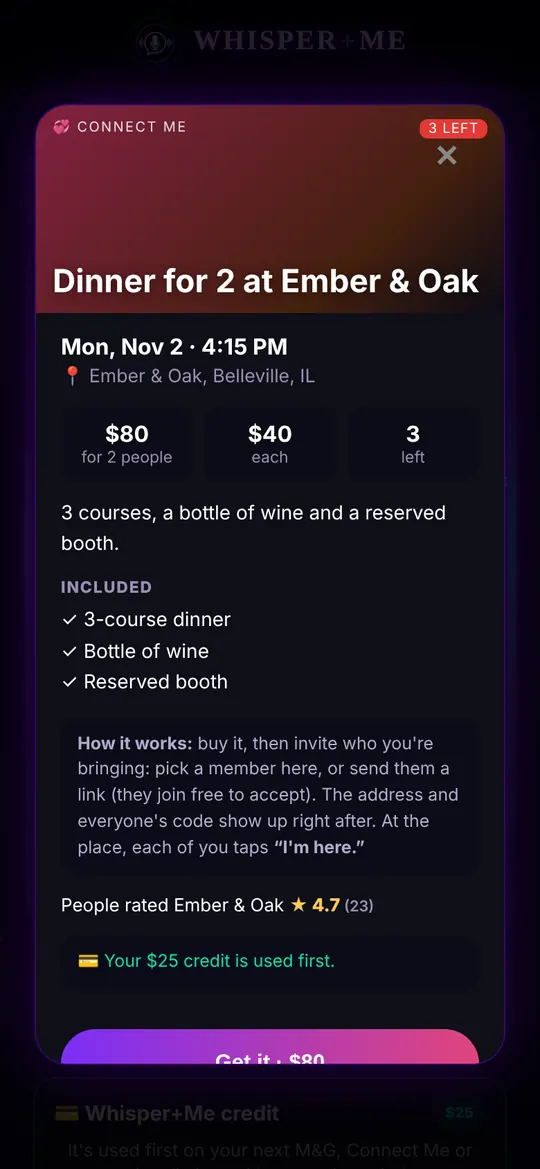
Connect Me packages are ready-made nights out at one price for 2 or 4 people, like dinner for two or bowling for four. You buy it, then invite who you're bringing. You must be 21+.
- Open ⭐ M&G → 💞 Connect MeEach card shows the place, the day, what's included and the price for the group.
- Tap Get itPay once for the whole group. Your Whisper+Me credit is used first.
- Invite who you're bringingPick a member, or send them a link. They join free and accept.
- Everyone checks inEach person gets their own code and taps I'm here at the place. If someone on your package doesn't show and you did, we may add a reward to your account.
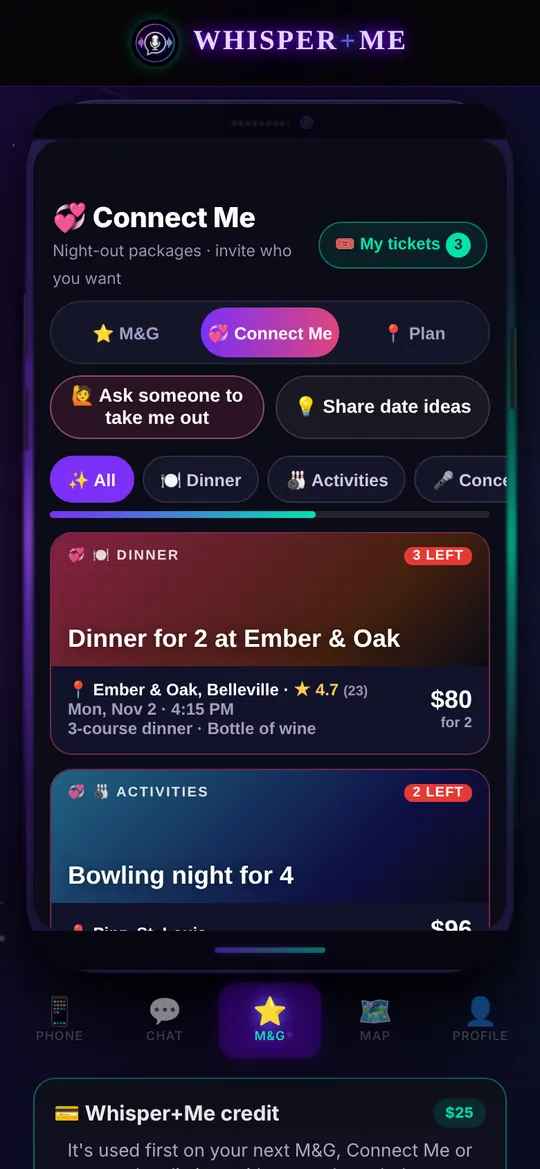
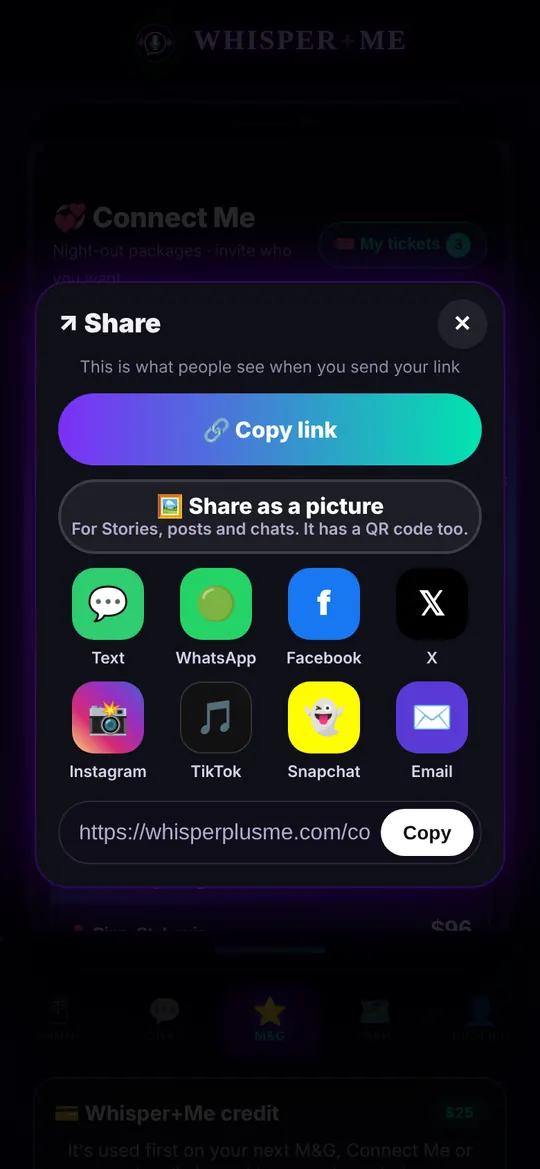
🙋 Ask someone to take me out: tap it to get a link to share on your Stories, posts or in a text. Whoever opens it can pick a night out and pay, and you get the invite. 💡 Share date ideas sends a picture of what's on now.
See every package on sale on the date ideas page.
📍 Plan a Date
Plan your own date anywhere, at a real public place, and pick who you go with. It works in any city, not just where Whisper+Me runs events.
Step 1: Post your date
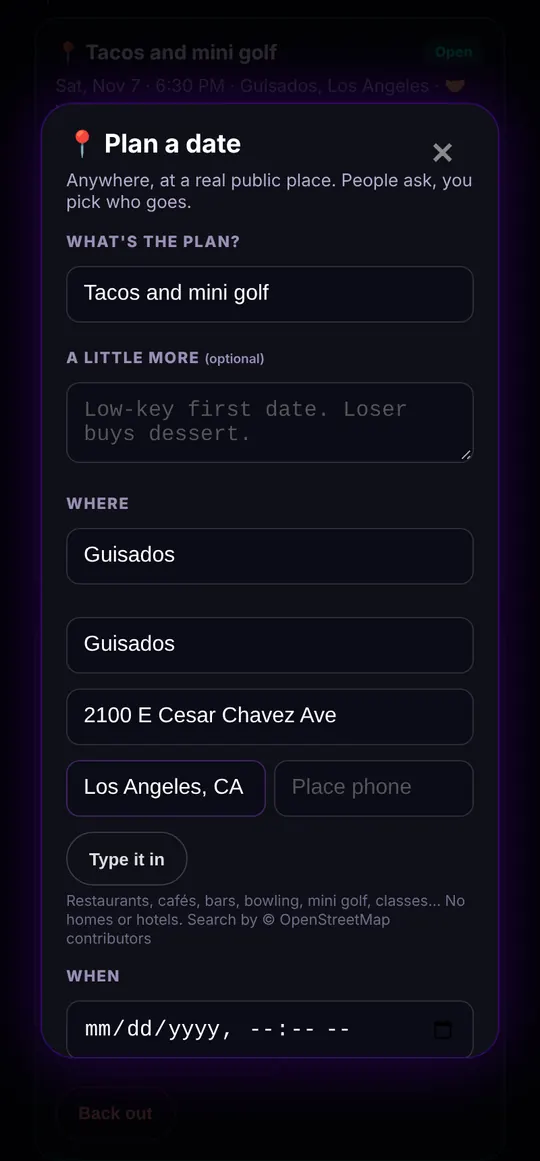
- Open ⭐ M&G → 📍 PlanTap the green 📍 Plan a date button. You need a profile photo first, so people know who they're meeting.
- Say what the plan isFor example Tacos and mini golf. Add a line or two more if you like.
- Pick the placeSearch for it (restaurant, café, bowling, pottery class…), or tap Type it in. Homes, hotels and Airbnbs aren't allowed.
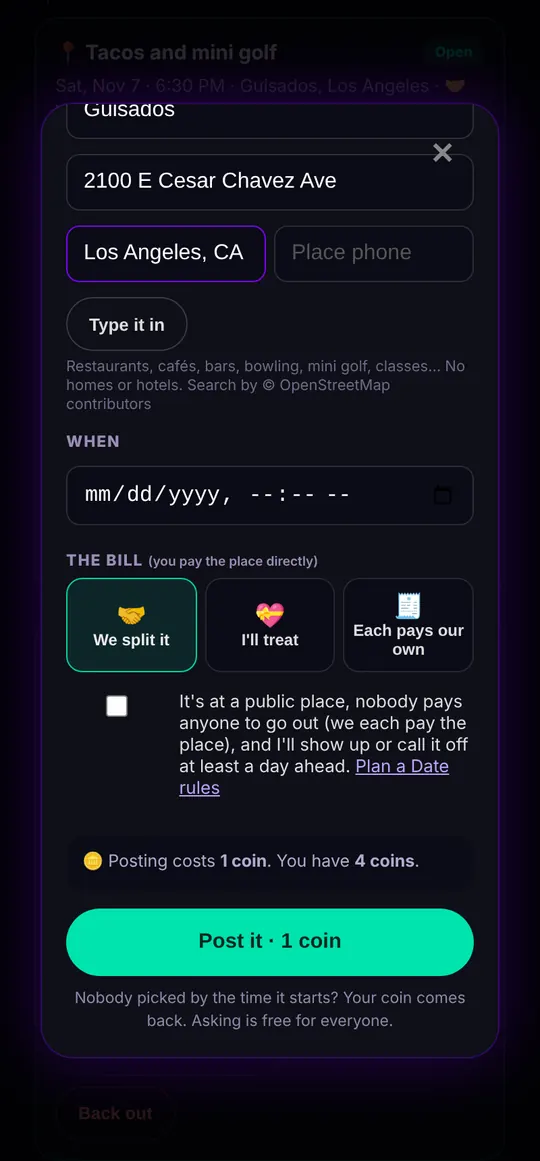
- Pick the day and timeAnywhere from 24 hours to 30 days ahead. The time is shown in your own time zone.
- Say who pays the billWe split it, I'll treat, or Each pays our own. Either way, you pay the place directly. Nobody pays the other person.
- Tick the rules box and post itPosting costs 1 coin ($3), taken from your coins. No coins? Tap Buy coins. Your date goes up right away.
Step 2: People ask to go
Your date shows on the 📍 Plan list. People nearby see it under Near me (about 25 miles), and anyone can find it under Everywhere. Tap ↗ Share to post it on your Stories or send it to someone: the link opens straight to your date.
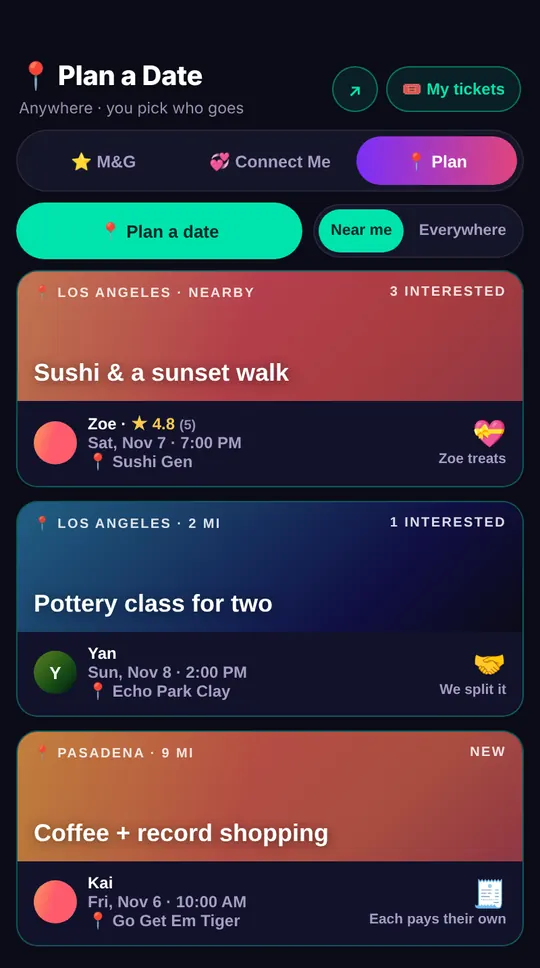
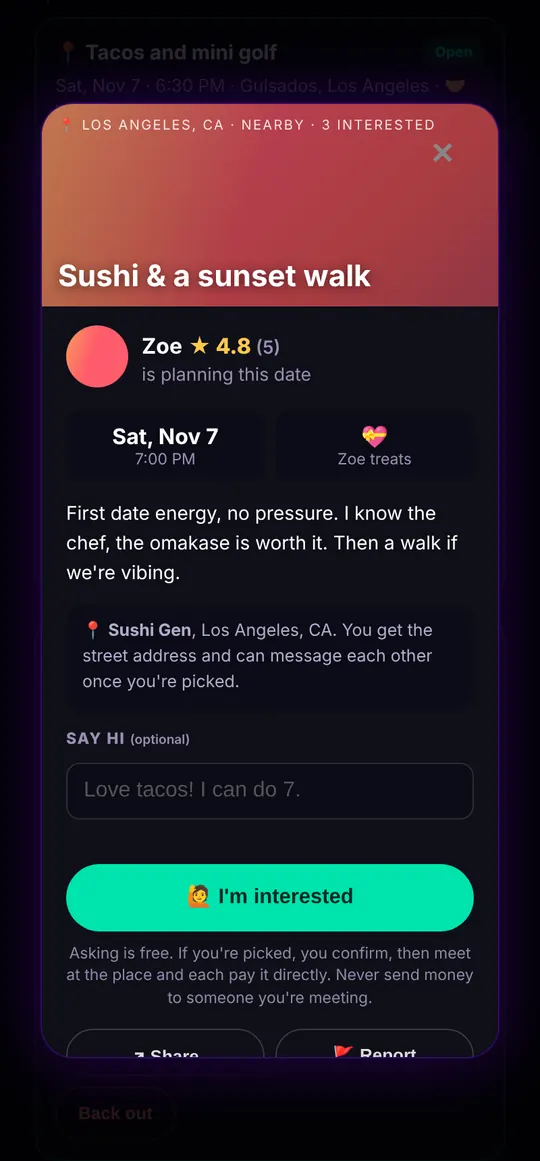
If you're the one asking: open a date, add a short hello if you like, and tap 🙋 I'm interested. It's free. You'll get a notification if you're picked. You can have up to 5 requests waiting at once, and you can take one back any time. If two people pick you for around the same time, the first one you confirm is your date: the other goes back to them, and your other requests for that time are taken back for you (dates need to be at least 4 hours apart). If a date is more than about 80 miles from where you are, you tick a box saying you'll be in town that day, and the person who posted it sees roughly how far away you are.
Step 3: Pick who goes
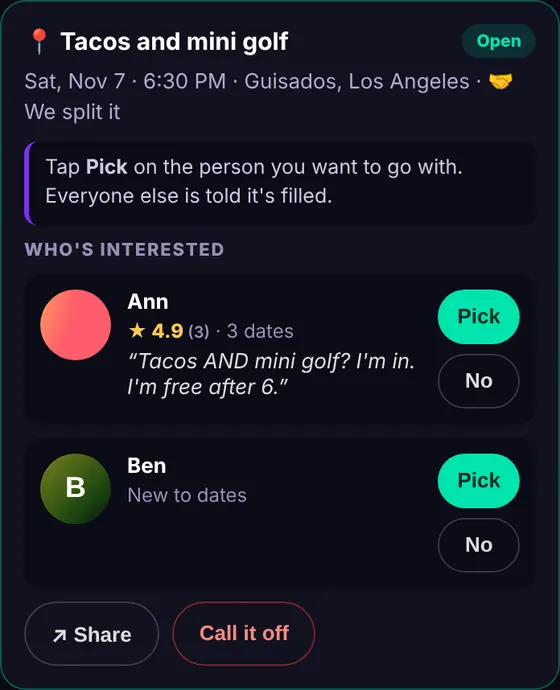
- Look under 📍 Your datesBelow the list, your date shows Who's interested: each person's photo, about how far away they are, their star rating from past dates, how many dates they've been on, and any no-shows. Tap a photo to see their profile.
- Tap Pick (or No)Pick one person. They have 12 hours to confirm (less if the date is soon).
- They confirmOnce they tap ✅ Confirm, it's a date. Everyone else who asked is told it's filled. If they pass or don't answer in time, you can pick someone else.
Step 4: Talk, then meet up
Once you're confirmed, both of you see the street address, the place's phone number and a Directions link, and you can message each other in the app.
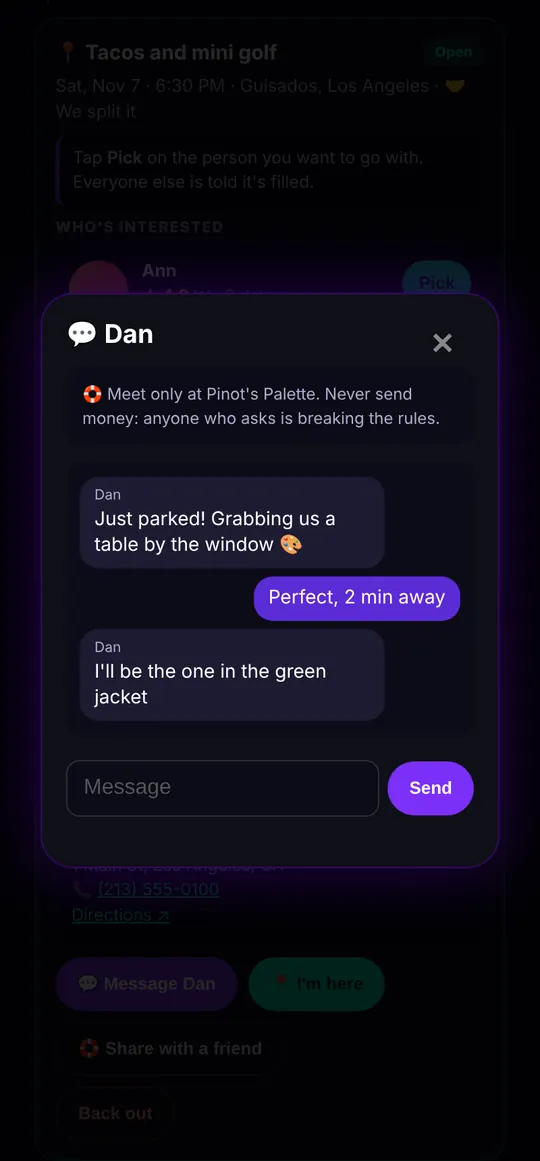
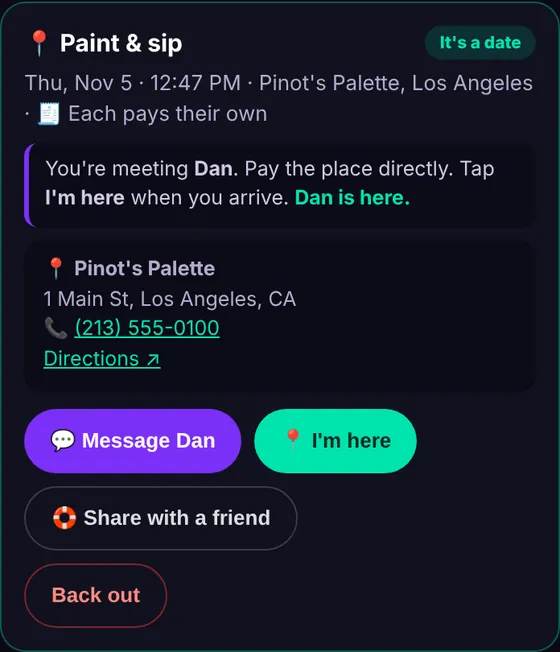
- 💬 Message each otherSort out the details. Anything about money, “allowances” or meeting somewhere private is blocked.
- 🛟 Share with a friendSends who you're meeting, where and when to a friend from your own phone.
- 📍 Tap I'm here when you arriveCheck-in opens an hour before. It uses your phone's location to confirm you're at the place. You'll see when your date has checked in too.
- Pay the placePay the restaurant or venue directly, the way the date said.
- ⭐ Rate each otherAfter the date you can both leave 1 to 5 stars. Stars show on your future dates.
Your coin, cancelling and no-shows
| What happens | The coin you paid to post |
|---|---|
| Nobody is picked or confirmed by the time it starts | ✅ Back in your coins |
| You call it off more than 24 hours ahead | ✅ Back in your coins |
| Your date doesn't show up and you checked in | ✅ Back, plus an extra coin |
| You call it off less than 24 hours ahead | ❌ Not returned (and a strike if it was confirmed) |
| Your date is removed for breaking the rules | ❌ Not returned |
Strikes: not showing up, or backing out of a confirmed date less than 24 hours before, is a strike. Too many strikes pause your access to M&G, Connect Me and Plan a Date. If the person you were meeting didn't come but you checked in, you get a coin for your trouble. If neither of you checks in, nobody gets a strike (in case location didn't work).
The rules
- 21 or older, with a real profile photo.
- Real public places only: no homes, hotels, motels or Airbnbs.
- Nobody pays anybody. You each pay the place, as the plan says. Asking for or offering money, gifts or an “allowance” gets you removed.
- Up to 3 of your dates can be up at a time.
- Show up, or call it off at least a day ahead.
Full details are in the Terms (Plan a Date).
💳 Credit & refunds
When something is canceled by a host, a venue or Whisper+Me, you get the money back as Whisper+Me credit right away. It's used first on your next M&G or Connect Me, with no card needed. (A Plan a Date coin comes straight back to your coins.)
Rather have it on your card? Open 🎟️ My tickets and tap Send it to my card instead. It's refunded to the card you paid with, usually in 5 to 10 days. M&G spots and Connect Me packages aren't refundable otherwise.
🛟 Staying safe
- Meet only at the public place you picked. Never go to someone's home or hotel.
- Tell a friend where you'll be. Plan a Date has a Share with a friend button for this.
- Never send money to someone you're meeting or talking to. Anyone who asks is breaking the rules: report them.
- Use 🚫 Block and 🚩 Report on any profile. Only Whisper+Me sees reports.
- Whisper+Me doesn't run background checks. Trust your gut and leave if something feels wrong.
- If you're in danger, call 911. If you're struggling, call or text 988 (Suicide & Crisis Lifeline, US).
❓ Questions
Is Whisper+Me free?
Yes. Joining, the voice chat rooms, text chat, the open mic and the map are free. You only pay for 1-on-1 calls and paid member rooms (with coins), M&G spots, Connect Me packages, and 1 coin to post a Plan a Date.
Do I need to download an app?
No. It runs in any browser on your phone or computer. You can add it to your home screen so it opens like an app.
How old do I have to be?
18 to use Whisper+Me. 21 to buy an M&G spot, a Connect Me package, or to post or ask for a Plan a Date. We ask your birth year once.
How much is a coin?
$3. Members set their call price from 1 to 10 coins. Creators earn $2 for every coin people spend calling them or joining their room.
How do I get paid as a creator?
Open 👤 Profile → Wallet and tap Set up payouts. Stripe sends your earnings to your bank once you reach $50.
Is Plan a Date a dating or escort service?
It's a way to plan a real outing at a public place and pick who goes. Members never pay each other: the two of you pay the place directly. Anyone who asks for or offers money is removed.
What if nobody picks my date?
If nobody is confirmed by the time it starts, the coin you paid to post it comes back automatically.
Can I use my Whisper+Me credit on my card instead?
Yes. Under 🎟️ My tickets, tap Send it to my card instead and it's refunded to the card you paid with (usually 5 to 10 days).
Who sees my messages in Plan a Date?
Only you and the person you're going with. Messages are deleted when a date is called off, or 30 days after it happens.
How do I report someone?
Open their profile and tap 🚩 Report, or use Report on a date or ticket. Only Whisper+Me sees reports. If you're in danger, call 911.
Still stuck? Email whisper.me.support@gmail.com.
Free · No download · 18+